Reading Events from Starknet Contracts
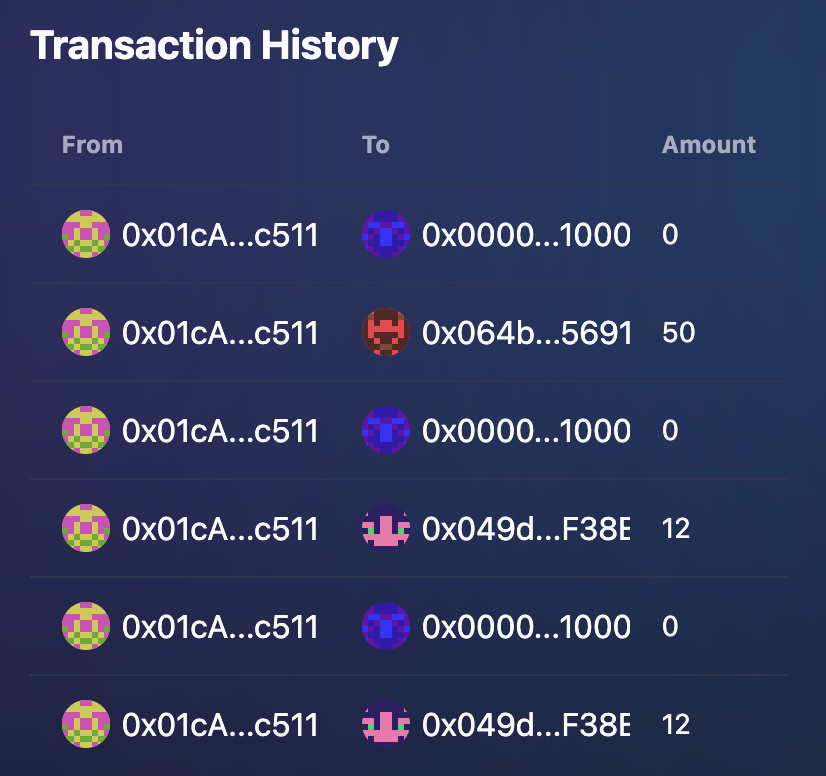
This recipe demonstrates how to read and process events emitted by Starknet contracts using the starknet-start library. We will try to create a simple Token Transfer History table using the useScaffoldEventHistory hook.
Here is the full code, which we will implement in the guide below:
"use client";

import { useScaffoldEventHistory } from "~~/hooks/scaffold-stark/useScaffoldEventHistory";
import { useAccount } from "~~/hooks/useAccount";
import { Address } from "./scaffold-stark/Address";

interface TransferEvent {
  args: {
    from: bigint;
    to: bigint;
    value: bigint;
  };
}

export const TransactionHistory = () => {
  const { address } = useAccount();

  const { data: transactions } = useScaffoldEventHistory({
    contractName: "Strk",
    eventName: "Transfer",
    watch: true,
    fromBlock: 0n,
  });

  return (
    <div className="overflow-x-auto">
      <h2 className="text-xl font-bold mb-4">Transaction History</h2>
      {transactions && transactions.length > 0 ? (
        <table className="table w-full">
          <thead>
            <tr>
              <th>From</th>
              <th>To</th>
              <th>Amount</th>
            </tr>
          </thead>
          <tbody>
            {(transactions as TransferEvent[]).map((tx, index) => {
              return (
                <tr key={index}>
                  <td className="truncate max-w-[150px]">
                    <Address address={`0x${BigInt(tx.args.from).toString(16)}`} />
                  </td>
                  <td className="truncate max-w-[150px]">
                    <Address address={`0x${BigInt(tx.args.to).toString(16)}`} />
                  </td>
                  <td>{Number(tx.args.value / BigInt(10 ** 18)).toString()}</td>
                </tr>
              );
            })}
          </tbody>
        </table>
      ) : transactions && transactions.length === 0 ? (
        <div className="text-center py-8 text-gray-500">No transactions found for this account.</div>
      ) : (
        <div className="text-center py-8 text-gray-500">Loading transaction history...</div>
      )}
    </div>
  );
};
Implementation guide
1. Create the Component and Add Imports
First, create a new file components/TransactionHistory.tsx and define the basic structure of your component. We also need to import the necessary hooks and components.
"use client";

import { useScaffoldEventHistory } from "~~/hooks/scaffold-stark/useScaffoldEventHistory";
import { useAccount } from "~~/hooks/useAccount";
import { Address } from "./scaffold-stark/Address";

export const TransactionHistory = () => {
  return <div className="overflow-x-auto">{/* Table structure will go here */}</div>;
};
We add "use client" at the top because this component uses hooks (useScaffoldEventHistory, useAccount) which manage state and interact with browser APIs, making it a Client Component in Next.js.
2. Define the Event Type
Since the events retrieved by useScaffoldEventHistory are currently typed as any, we need to define an interface that matches the structure of the specific event we are interested in (in this case, the Transfer event from an ERC20 contract).
"use client";

import { useScaffoldEventHistory } from "~~/hooks/scaffold-stark/useScaffoldEventHistory";
import { useAccount } from "~~/hooks/useAccount";
import { Address } from "./scaffold-stark/Address";

interface TransferEvent {
  args: {
    from: bigint;
    to: bigint;
    value: bigint;
  };
}

export const TransactionHistory = () => {
  return <div className="overflow-x-auto">{/* Table structure will go here */}</div>;
};
You need to know the structure (args) of the event emitted by your target contract beforehand to define the correct interface. You can usually find this in the contract's source code or ABI.
3. Get User Account
We use the useAccount hook to get the connected user's Starknet address. Although not directly used for filtering in this specific hook example, it's often needed when interacting with user-specific data.
"use client";

import { useScaffoldEventHistory } from "~~/hooks/scaffold-stark/useScaffoldEventHistory";
import { useAccount } from "~~/hooks/useAccount";
import { Address } from "./scaffold-stark/Address";

interface TransferEvent {
  args: {
    from: bigint;
    to: bigint;
    value: bigint;
  };
}

export const TransactionHistory = () => {
  const { address } = useAccount();

  return <div className="overflow-x-auto">{/* Table structure will go here */}</div>;
};
4. Fetch Event History
Use the useScaffoldEventHistory hook to fetch the events. Configure it with the contractName, eventName, whether to watch for new events, and the starting block (fromBlock).
"use client";

import { useScaffoldEventHistory } from "~~/hooks/scaffold-stark/useScaffoldEventHistory";
import { useAccount } from "~~/hooks/useAccount";
import { Address } from "./scaffold-stark/Address";

interface TransferEvent {
  args: {
    from: bigint;
    to: bigint;
    value: bigint;
  };
}

export const TransactionHistory = () => {
  const { address } = useAccount();

  const { data: transactions } = useScaffoldEventHistory({
    contractName: "Strk",
    eventName: "Transfer",
    watch: true, // Keep listening for new events
    fromBlock: 0n, // Start from the genesis block
  });

  return <div className="overflow-x-auto">{/* Table structure will go here */}</div>;
};
The useScaffoldStarkEventHistory would have the event name available on the autocomplete feature.
Currently, event names can be quite long, including the full path to the event definition within the contract modules (e.g., openzeppelin::token::erc20_v070::erc20::ERC20::Transfer). Efforts are underway in the Scaffold Stark team to simplify this.
5. Set Up the Table Structure
Create the basic HTML table structure to display the transaction history.
"use client";

import { useScaffoldEventHistory } from "~~/hooks/scaffold-stark/useScaffoldEventHistory";
import { useAccount } from "~~/hooks/useAccount";
import { Address } from "./scaffold-stark/Address";

interface TransferEvent {
  args: {
    from: bigint;
    to: bigint;
    value: bigint;
  };
}

export const TransactionHistory = () => {
  const { address } = useAccount();

  const { data: transactions } = useScaffoldEventHistory({
    contractName: "Strk",
    eventName: "Transfer",
    watch: true,
    fromBlock: 0n,
  });

  return (
    <div className="overflow-x-auto">
      <h2 className="text-xl font-bold mb-4">Transaction History</h2>
      <table className="table w-full">
        <thead>
          <tr>
            <th>From</th>
            <th>To</th>
            <th>Amount</th>
          </tr>
        </thead>
        <tbody>{/* Transaction rows will be rendered here */}</tbody>
      </table>
    </div>
  );
};
6. Render Transaction Rows
Map over the transactions data returned by the hook. Since transactions is typed as any[], we assert its type to TransferEvent[] to access the structured args.
"use client";

// ... imports and interface ...

export const TransactionHistory = () => {
  // ... hooks ...

  return (
    <div className="overflow-x-auto">
      <h2 className="text-xl font-bold mb-4">Transaction History</h2>
      <table className="table w-full">
        <thead>
          <tr>
            <th>From</th>
            <th>To</th>
            <th>Amount</th>
          </tr>
        </thead>
        <tbody>
          {(transactions as TransferEvent[]).map((tx, index) => {
            return (
              <tr key={index}>
                <td className="truncate max-w-[150px]">{/* From Address */}</td>
                <td className="truncate max-w-[150px]">{/* To Address */}</td>
                <td>{/* Amount */}</td>
              </tr>
            );
          })}
        </tbody>
      </table>
    </div>
  );
};
The (transactions as TransferEvent[]) part is a type assertion. It tells TypeScript to treat the transactions array as an array of our defined TransferEvent objects, allowing us to access tx.args.from, tx.args.to, and tx.args.value safely (assuming the fetched data matches the interface).
7. Format and Display Addresses
Event arguments like addresses often come as raw BigInt values. We need to convert them to the standard hexadecimal 0x... format string before passing them to the Address component for display.
// ... inside the map function ...
<tr key={index}>
  <td className="truncate max-w-[150px]">
    <Address address={`0x${BigInt(tx.args.from).toString(16)}`} />
  </td>
  <td className="truncate max-w-[150px]">
    <Address address={`0x${BigInt(tx.args.to).toString(16)}`} />
  </td>
  <td>{/* Amount */}</td>
</tr>
// ...
BigInt(tx.args.from)ensures we are working with a BigInt..toString(16)converts the BigInt to its hexadecimal representation (as a string).`0x${...}`prepends the necessary "0x" prefix.- The result is passed to the
Addresscomponent, which handles rendering, blockie generation, and linking to block explorers. Refer to theAddresscomponent documentation for more details.
Step 8: Format and Display Token Value
The value argument in ERC20 Transfer events represents the amount in the smallest unit (like wei for Ether or STRK). Since Starknet (like many blockchains) doesn't handle floating-point numbers directly in contracts, values are stored as large integers. To display it in a human-readable format (e.g., STRK instead of wei), divide by 1018 (for standard 18-decimal tokens).
// ... inside the map function ...
                <td className="truncate max-w-[150px]">
                  <Address address={`0x${BigInt(tx.args.to).toString(16)}`} />
                </td>
                <td>{Number(tx.args.value / BigInt(10 ** 18)).toString()}</td>
              </tr>
// ...
BigInt(10 ** 18)creates the divisor as a BigInt.tx.args.value / BigInt(10 ** 18)performs the division using BigInt arithmetic.Number(...)converts the resulting BigInt (which might lose precision if it had fractional parts, but is fine for display here) to a standard JavaScript number..toString()converts the number to a string for rendering. You might use.toFixed()for better formatting of decimals if needed.
Step 9: Add Loading and Empty States
Finally, add conditional rendering to show a loading message while transactions is undefined (initial state) and a "No transactions found" message if the transactions array is empty after loading. This wraps the table display logic.
"use client";

import { useScaffoldEventHistory } from "~~/hooks/scaffold-stark/useScaffoldEventHistory";
import { useAccount } from "~~/hooks/useAccount";
import { Address } from "./scaffold-stark/Address";

interface TransferEvent {
  args: {
    from: bigint;
    to: bigint;
    value: bigint;
  };
}

export const TransactionHistory = () => {
  const { address } = useAccount();

  const { data: transactions } = useScaffoldEventHistory({
    contractName: "Strk",
    eventName: "Transfer",
    watch: true,
    fromBlock: 0n,
  });

  return (
    <div className="overflow-x-auto">
      <h2 className="text-xl font-bold mb-4">Transaction History</h2>
      {transactions && transactions.length > 0 ? ( // Check if transactions exist and have items
        <table className="table w-full">
          <thead>
            <tr>
              <th>From</th>
              <th>To</th>
              <th>Amount</th>
            </tr>
          </thead>
          <tbody>
            {(transactions as TransferEvent[]).map((tx, index) => {
              return (
                <tr key={index}>
                  <td className="truncate max-w-[150px]">
                    <Address address={`0x${BigInt(tx.args.from).toString(16)}`} />
                  </td>
                  <td className="truncate max-w-[150px]">
                    <Address address={`0x${BigInt(tx.args.to).toString(16)}`} />
                  </td>
                  <td>{Number(tx.args.value / BigInt(10 ** 18)).toString()}</td>
                </tr>
              );
            })}
          </tbody>
        </table>
      ) : transactions && transactions.length === 0 ? ( // Check if transactions exist but are empty
        <div className="text-center py-8 text-gray-500">No transactions found for this account.</div>
      ) : (
        // Otherwise, it must be loading (transactions is undefined)
        <div className="text-center py-8 text-gray-500">Loading transaction history...</div>
      )}
    </div>
  );
};
This completes the TransactionHistory component, providing a clear view of token transfers fetched from Starknet contract events!
Here's how the final component might look when rendered: